01 · MINERAL
40Ar/39Ar THERMOCHRONOLOGY · macOS
MacArgon
Forward and inverse modelling for testing how arbitrary pressure–temperature–time paths, diffusion-domain structure and mineral growth or recrystallisation shape argon retention and step-heating age spectra.
PLATFORMMac
A document-based workspace for macOS.
MODELSForward + inverse
Test a proposed history or seek an admissible fit.
DOMAINSSingle + multiple
Sphere, cylinder and slab diffusion geometries.
PRIVACYData not collected
Your project documents remain under your control.
FROM GEOLOGICAL MODEL TO TESTABLE SPECTRUM
Ask what thermal history could have produced the argon record you observe.
02 · HISTORY
Draw an arbitrary P–T–t path.
Create cooling, heating, burial and exhumation histories point by point or import a tagged path. Link mineral growth, recrystallisation or diffusion-domain reduction to control points when the geological model requires a microstructural event.03 · EXPERIMENT
Run the MacSpectrometer.
Apply the default or an imported furnace step-heating schedule. MacArgon calculates argon accumulation and loss through time, then displays the simulated apparent-age spectrum alongside the path that produced it.04 · INTERPRETATION
Fit and test admissible histories.
Import a measured reference spectrum, select and weight control steps, and perturb chosen P–T–t points with the Monte Carlo workflow. Then calculate a sensitivity envelope to see where the fit is most responsive to the path.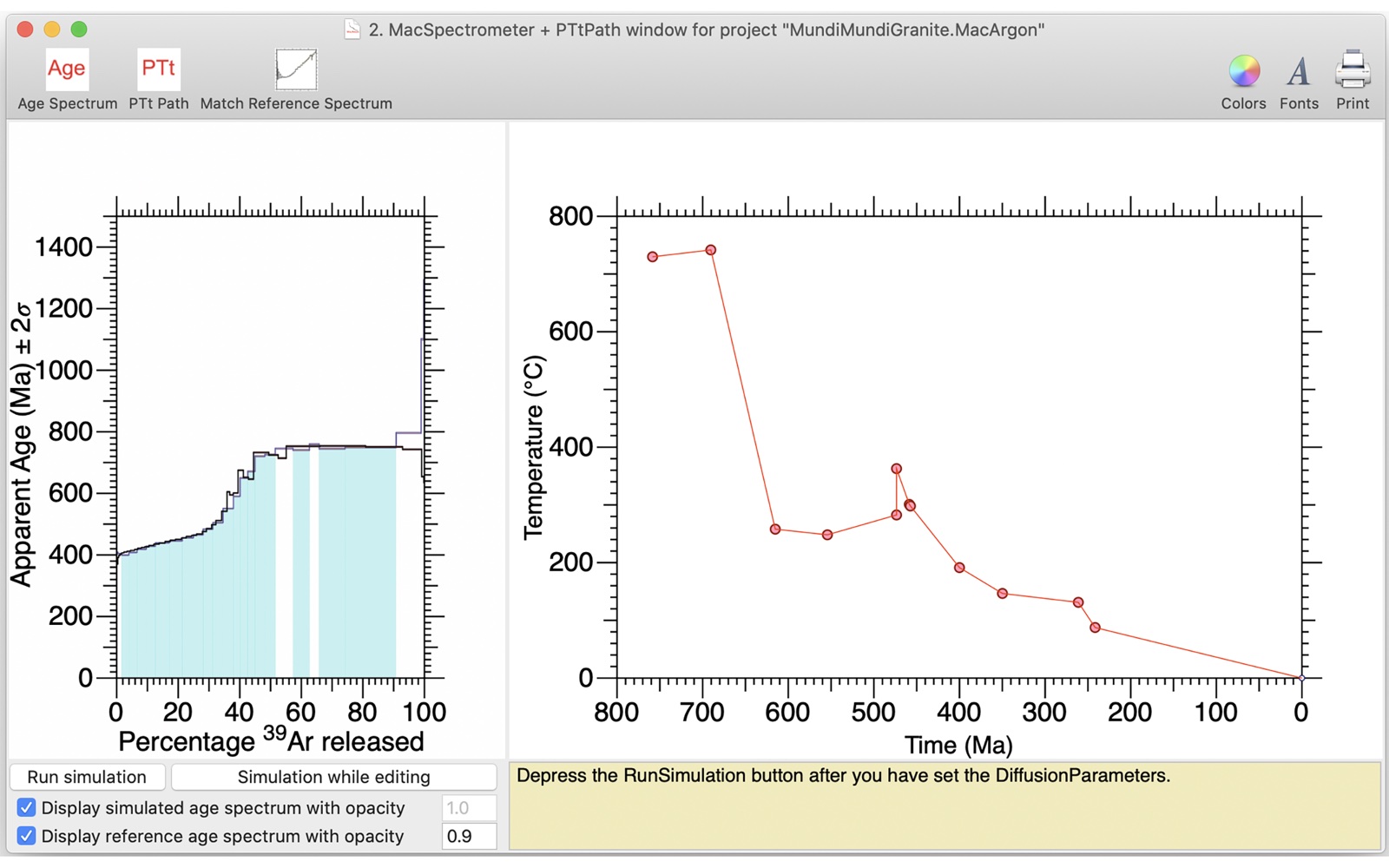
A simulated age spectrum and its temperature–time path stay visible together, so the consequence of a modelling change can be inspected directly.
Work with your own paths, experiments and spectra.
MacArgon keeps the ingredients of a simulation together in a reusable document and supports exchange through simply tagged text and XML.
BRING DATA IN
Import the experimental setup.
- Pressure–temperature–time paths
- Furnace step-heating schedules
- Measured reference age spectra
- Diffusion-domain parameters
TAKE RESULTS OUT
Preserve the model and its outputs.
- MacArgon project documents
- Simulated spectra and current P–T–t paths
- Publication-oriented XML exports
- PDF plots for spectra, paths and combined views
Start with a working model, then follow the science.
Open the example document to see the workflow in context, read the foundational method, or install the current Mac release.
MAC APP STORE
Get MacArgon
Open MacArgon’s direct App Store listing for the current version, compatibility and purchase information.
View MacArgon →EXAMPLE PROJECT · ZIP
Open a MacArgon document
Download, unzip and open the example before building your own model crystal and P–T–t path.
Download example →FOUNDATIONAL PAPER
Arbitrary P–T–t histories
Lister & Baldwin (1996), Tectonophysics 253, 83–109.
Open DOI →